
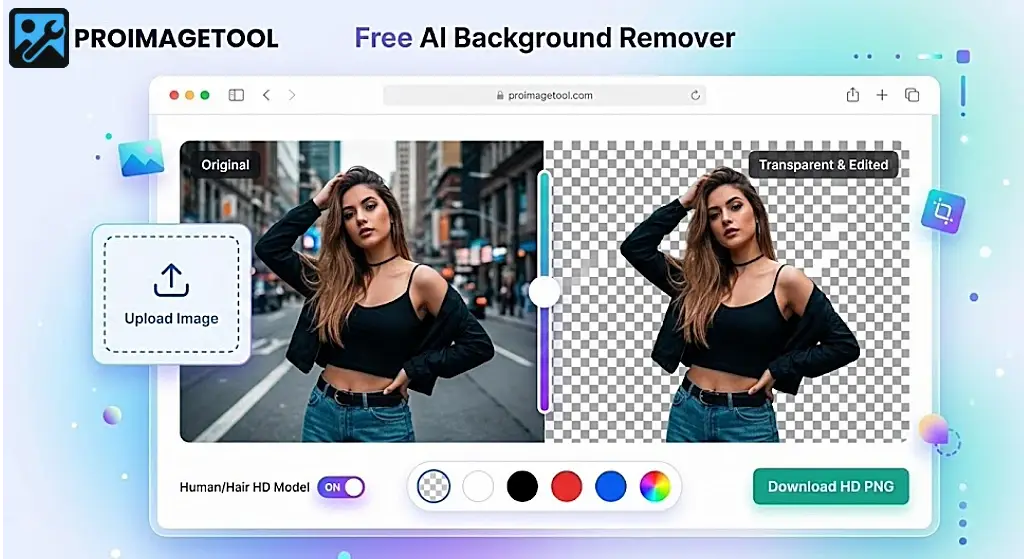
Welcome to the ultimate solution for professional photo editing. If you are tired of using online tools that compress your images and ruin the resolution, you are in the right place. Our advanced browser-based tool allows you to remove background without losing quality free. Whether you are a graphic designer, an e-commerce seller, or just someone looking to edit a personal portrait, maintaining the original high definition of your image is crucial.
Most free tools on the internet resize your high-resolution photos to smaller dimensions (like 500x500 pixels) to save their server costs. We do things differently. By leveraging the power of client-side processing, our platform provides a seamless way to remove background from image free high quality without any hidden fees, subscriptions, or premium lock-outs.
Why Choose Our HD AI Background Eraser?
Finding a reliable tool that doesn't compromise on your photo's pixel density is a challenge. Here is why ProImageTool stands out from the competition:
- Zero Compression: We guarantee that the resolution of your uploaded image matches the resolution of your downloaded image. This is the only place to truly get remove background hd quality free ai processing.
- 100% Privacy & Security: Unlike cloud-based editors, your photos never leave your device. The AI engine runs entirely inside your web browser. This means you can use our remove background from image free no sign up service with complete peace of mind.
- Smart Hair & Edge Detection: Cutting out human hair, animal fur, or complex product edges is notoriously difficult. Our dedicated "Portrait HD" mode uses advanced neural networks to separate the foreground from the background with surgical precision.
- Instant Color Replacement: Need a white background for a passport photo or an Amazon product listing? Our built-in palette lets you change photo background color online free in just one click.
Step-by-Step Guide: How to Use the ProImageTool Background Remover
We have designed our interface to be as intuitive as possible. You don't need any Photoshop skills to get a perfect transparent cutout. Just follow these simple steps:
Step 1: Upload Your Image
Start by clicking the upload box at the top of the page. You can select any JPG, PNG, or WEBP image from your computer or mobile device. Because we offer a remove background from image free no sign up experience, you don't need to create an account or verify an email. Just upload and go.
Step 2: Select the AI Processing Mode
For standard objects like cars, gadgets, or logos, the "General Mode" works perfectly. However, if your photo contains a human subject with detailed hair, toggle the switch to "Human / Hair HD". This activates our specialized neural model, ensuring you get the best remove background hd quality free ai results.
Step 3: Let the AI Work its Magic
Once you select your mode, our on-device AI will automatically analyze the image, identify the main subject, and erase the background. You can use the interactive "Before & After" slider to compare the original photo with the transparent cutout. This is how we ensure you can remove background without losing quality free.
Step 4: Change Photo Background Color (Optional)
Do you need a solid color instead of transparency? Scroll down to our advanced color palette. Here, you can change photo background color online free. Click on the predefined swatches like white, blue, or red, or use the custom color picker to match your brand's exact hex code. You can even upload a completely new background image to place behind your subject!
Step 5: Download Your HD Export
Once you are satisfied with the edit, simply click the "Download" button. Our smart system will automatically format your image. If you chose a transparent background, you will receive a lossless PNG file. To learn more about why PNGs are essential for transparency, you can read this external guide on the PNG format. If you added a solid color, the tool will export a high-quality JPG, ensuring maximum compatibility and a smaller file size without sacrificing clarity.
The Importance of High-Resolution Background Removal
Why does resolution matter so much? In the digital age, visual quality directly impacts trust and engagement. If you are an e-commerce business owner, displaying products with jagged edges or blurry pixels can reduce your conversion rates. Customers expect crisp, clean, and professional imagery.
By using a tool to remove background from image free high quality, you maintain the integrity of your product shots. The same applies to professional headshots, YouTube thumbnails, and social media graphics. A blurry cutout looks amateurish, while a sharp, HD cutout looks like it was done in a premium desktop software.
Explore More ProImageTools
We are dedicated to providing the best free imaging solutions on the web. Once you have perfected your transparent image, you might need to resize it for a specific social media platform or compress it for a faster website loading time. Be sure to check out our other free utilities, such as our Free Online Image Resizer to complete your creative workflow.
Frequently Asked Questions (FAQs)
1. Is this tool really 100% free with no watermarks?
Yes, absolutely. You can remove background without losing quality free and we will never add a watermark to your final image. There are no premium tiers, hidden fees, or daily limits.
2. Does the image resolution drop after processing?
No. Most competitors downscale your images. Our platform is designed to provide remove background hd quality free ai processing, meaning your 4K image will remain a 4K image even after the background is removed.
3. Can I make the background white for a passport photo?
Yes! Once the AI removes the original background, you can use our toolbar to change photo background color online free. Simply click the white color swatch, and download your image as a high-quality JPG ready for official use.
4. Are my photos safe? Do you store them on a server?
Your privacy is our top priority. Because we offer a remove background from image free no sign up service powered by WebAssembly, all processing happens entirely inside your own browser. Your photos are never uploaded to any external server or stored in any database.
5. What formats are supported?
You can upload JPG, JPEG, PNG, and WEBP files. If you keep the background transparent, the tool exports a PNG. If you add a background color, it exports a highly optimized JPG.